There are a couple of great stitchy giveaways going on right now...
Nia's giving away a gift certificate to celebrate her birthday AND blogiversary! Click on the logo to go to her blog and enter!
Next, Cottage Garden Samplings is celebrating her grand opening with some very lovely things...I won't post a picture to tempt you, but I will say there are SCISSORS involved! =)
Also, don't forget my poor, neglected scrapbooking software giveaway...if you enter now, your chances are excellent. =P
Thursday, July 12, 2012
Sunday, July 8, 2012
Hot Hot Hot WIPocalypse Check-in
Click now for JiffNotes

I totally convinced myself the full moon was today, not Tuesday.
Actually, I convinced myself it was THURSDAY, so that's even worse...I'm forgetful AND late! Maybe it's the heat? We set a record here this week: 106 F! Yes, the South is hot, but we rarely spend days over 100!
Not too much got done this past month due to my epic European vacation (yeah...pictures...I should get on that). Not wanting to overload the suitcase, I only took two small knitting projects (socks and a wrap). When I got back from the trip, I was pretty brain-dead, but I did manage to make a little progress on a couple WIPocalypse projects. (OK, OK, they were also Jumanji June projects, but you won't hold that against me, right??)
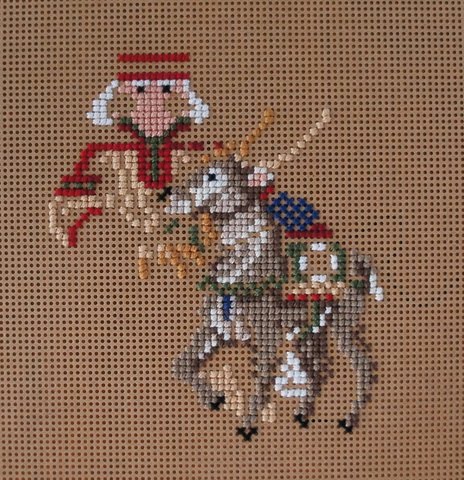
First, my Lapland Santa has progressed a bunch. The reindeer is almost done except for beads! (There are a lot, since it's a Mill Hill kit.)
I did a little work on Random Thoughts...it's been a while since I posted a full shot of it, so here it is...


I totally convinced myself the full moon was today, not Tuesday.
Actually, I convinced myself it was THURSDAY, so that's even worse...I'm forgetful AND late! Maybe it's the heat? We set a record here this week: 106 F! Yes, the South is hot, but we rarely spend days over 100!
Not too much got done this past month due to my epic European vacation (yeah...pictures...I should get on that). Not wanting to overload the suitcase, I only took two small knitting projects (socks and a wrap). When I got back from the trip, I was pretty brain-dead, but I did manage to make a little progress on a couple WIPocalypse projects. (OK, OK, they were also Jumanji June projects, but you won't hold that against me, right??)
First, my Lapland Santa has progressed a bunch. The reindeer is almost done except for beads! (There are a lot, since it's a Mill Hill kit.)
I did a little work on Random Thoughts...it's been a while since I posted a full shot of it, so here it is...
| JiffNotes |
|---|
| Visit Measi's blog to see more earth-shaking WIPocalypse posts by clicking the graphic at the top of this post! Also, don't forget my giveaway of MyMemories, software for digital scrapbooking. Click here to read my crazy-long post and enter! |
Friday, July 6, 2012
Scrapbooking Software Giveaway!

Before I went on vacation to Europe, I was asked to review some digital scrapbooking software! This software, MyMemories suite, is actually the highest rated digital scrapbooking software. I was very excited, because I've been considering doing digital scrapping. It's become clear to me that I'm not going to physically scrap, since the one scrapbook I own has been sitting in the garage for about 10 years!
But what the heck do I know about digital scrapbooking? Clearly, nothing. So, I enlisted the help of Erin, who usually blogs at Erin Expounds. I asked her some questions about how she scraps and what she'd look for in digital scrapbooking software. It turns out that a lot of people just use Photoshop or Paint Shop Pro. This left me wondering...why buy dedicated scrapping software if you can just use a graphics program?
My conclusion: This software makes it a lot easier to manage albums, and view your digital assets in categories, than a regular graphics program would. Plus, it lets you create a slideshow (and even add music!) or export your album easily to a format for your iPod or Apple tablet.
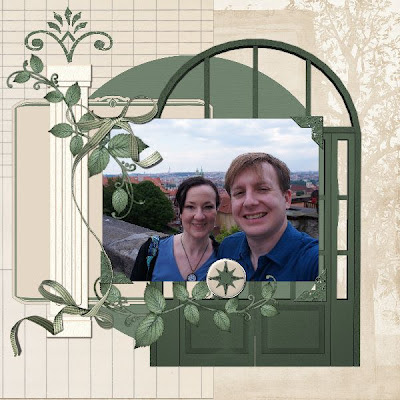
I spent several hours playing around with the software, trying to figure things out and try to check off all the features Erin told me digital scrapping software should have. Those features were layers, text paths, photo editing, clipping masks, and shadows, as well as the ability to use assets from other online stores. MyMemories passed on all of them except clipping masks (and text paths, with a caveat that you may still be able to do what you want with their Word Art and Text Shapes...text paths seem to be a Photoshop thing). If you're interested in my specific findings, feel free to email me (heather at lottloft dot com), because if I gave you the complete rundown, this post would be extra-extra long (instead of just extra long =). Instead, I'm just going to give you some quick highlights.
When you fire up the software for the first time, this dialog greets you
Once you've created some albums, they'll show up at the bottom and you can select them to start.
At first, I chose the Designer Template option, but later I just designed my own. To pick the template, you view a thumbnail of one of the pages.
Once you hit next, you can select which pages you want in the album (notice this window shows you how many pages are in each one...that's the number of layouts, not the number of pages you can have).
After selecting your pages, you can even opt to fill them in automatically from a folder!
This was so crazy to me, I had to try it (while typing this...one minor annoyance was MyMemories kept wanting to pop into the foreground...argh!). I was pleasantly surprised by the next step:
Oh, OK...that's not SO crazy. I can actually add/remove and rotate photos, so I don't have to get the whole thing together before I go into MyMemories (although, notice you can only sort them by name or date). Cool! I used our "favorites" from the Salzburg leg of our Europe trip, which was about 35 photos. It only took 3 minutes for the album to generate! And it actually did a pretty good job grouping the photos together. If I'd actually taken the time to put them in order, it would have been even better! Once the album is there, you can switch out photos. So despite my extreme skepticism, I think this would work really well if you know you're going to use one layout for a whole album!
I'll show you a couple other pages I did. This first one, I literally grabbed the first picture I took on vacation, which is the new international terminal at the ATL airport. (Sidenote: those transparent circles are smart glass, which turns opaque when a current is applied to it. I took a video which I'll post at some point. ;) This page was my proof-of-concept for using another vendor's assets with MyMemories (the alphabet), plus for me figuring out what the heck the difference was in an embellishment and an imprint (imprints are like stamps; you can color them).
It's pretty rudimentary...I'm no great designer. =) But it only took me about 10 minutes, and I was learning a lot during that time! I used a background, swirl embellishment, shadowing, an imprint and the alphabet.
Here's one where I started out with a photo layout. This is me and the girls having lunch at the Swan Coach House.
Everything here (layout, background, embellishments, mats and Word Art) are available out-of-the-box with MyMemories! I like a lot of the embellishments that come with the software, although some categories (the standard buttons, bows, and ribbons--which look kind of flat) leave something to be desired. But the backgrounds are a lot of fun and come with a lot of options. I wish you could choose your own colors for backgrounds like this one. Oh! That reminds me...the "color picker" tool is excellent. It zooms in to your page on the dialog box so you don't have to zoom in just to pick a color.
So I learned lots of good tidbits just by playing with the software (for instance, to get a shaped picture, it works better to add your picture and resize it, then apply the shape, rather than adding a shape and putting a picture in it, because you have no control over how it will be cropped/resized). All of the MyMemories documentation is online...the help as well as the user manual. However, the manual is a PDF, so you could download it to your computer if you wanted to read it and work offline. You can find MyMemories on Facebook, Twitter @mymemoriessuite, or their Blog, which is jam-packed with helpful content. Liz J., who hosts the blog, even has a bunch of video tutorials. What I really love, though, is that she has made PDF tutorial sheets for most of them...because, you know, sometimes I don't want to listen for 10 minutes when I can find the answer myself in 10 seconds. =) (That's how I figured out that a "quickpage" is just an "embellishment"!) She also highlights sale elements, designers, and has weekly challenges which can not only motivate you to get some scrapping done, but also let you win more free stuff!
So to sum up...
Cons:
-Each kit you buy shows up as an installed program in Windows (Control Panel->Programs and Features). That could get cluttered if you have a bunch.
-If you buy/download a kit from another site, you have to either navigate to use the elements, or...if you're little techno-savvy, you can figure out how to get them in the regular list. (I'll post about that later if there's enough interest! =)
-No integrated help
-No text paths, although you can create circular text and curves with Word Art, and some shapes with the Text tool
-No clipping masks
Pros:
-The same price or less than getting a good graphics program, with many additional helpful scrapping features
-Lets you easily navigate your scrapping assets (there's a "search" box on the embellishments dialog!)
-Easy to build/export albums, calendars, Facebook/blog headers, iPod format or even slide shows and DVDs!
-Great customer support
-Lots of freebies!
-Includes basic photo editing features (crop, red eye, filters)
So here's the exciting part: You can win a copy of the software!! Just visit the MyMemories store, then come back here and leave me a comment telling me what your favorite new kit is. You might also want to take a look at all the free kits they have! I'll pick a winner on July 29th. And if you feel like you can't wait to get your hands on a copy of the software, you can use the code below to get $10 off the price, plus a $10 credit in the store! Here's the code (copy and paste it on the "Shopping Cart" page):
STMMMS37099
Disclaimer: I was given a copy of this digital scrapbooking software for review purposes, along with a $10 credit to their store, as well as the discount code for you guys. I do get some proceeds if you use my discount code to buy the software! But I think you guys know I'm fairly brutally honest. =)
Monday, July 2, 2012
The Geekend That Was, 7/1 (LOL edition)
Click now for JiffNotes
Last week, Michael got windfall tickets for us to see Jerry Seinfeld! He was performing for a conference at the Georgia World Congress Center (about 7 blocks from our place) for a convention of human resources workers. I didn't really want to go; it was last-minute (like, 4 hours advance notice), and I figured it'd be in a huge auditorium where we'd really be watching him on a screen. So why not just stay home and watch him on TV?
Well, it turned out because Michael's company had a booth at this conference, we got to sit in the special vendor seating...IN THE 10TH ROW!!! Crappy cell phone picture courtesy of Michael's coworker (who was reluctant to share, due to the crappiness):
He went for almost 90 minutes, and I have never laughed so hard or so much for so long in my life! Most of the last part, I was rendered incapable of making any noise. I was completely convinced my stomach muscles would be sore the next day from laughing so hard!
Friday I got to go to lunch with Erin, who I haven't seen (in person) in forever, even though we live only about 20 minutes away from each other. I suggested YEAH Burger, which helped Erin with her 101 things list (for trying a new-to-her restaurant). She also graciously gave me some help with a little project that I'll be mentioning soon (you should be interested because it may result in FREE STUFF for you =).
Saturday Michael and I had a wedding to attend in the evening, but we went to see Safety Not Guaranteed in the morning. We thoroughly enjoyed the movie. In a nutshell, an intern at a magazine signs up to go on a trip to help research a cryptic want ad her boss has seen in the paper: "WANTED: Someone to go back in time with me. This is not a joke. You'll get paid after we get back. Must bring your own weapons. I have only done this once before. SAFETY NOT GUARANTEED" (We have a title!) Is the guy for real? Crazy? Dangerous? The film keeps you guessing until the end. It's rated R (mostly for language...two f-bombs and it's an automatic R...some sensuality, and references to drug use). Honestly, I only had two main problems with the film. They called a dulcimer a "zither". Yes, a dulcimer is a type of zither. But when people ask what I drive, I don't generally say, "a car," I say, "a Prius". =) There was also a SHOCKING lack of visual continuity. A blanket is on her lap, around her shoulders, around his shoulders, on her lap, on his lap!!!
Sunday Michael wasn't feeling well (plus it was over 100!) so we stayed in and I did everything but blog. =)
Last week, Michael got windfall tickets for us to see Jerry Seinfeld! He was performing for a conference at the Georgia World Congress Center (about 7 blocks from our place) for a convention of human resources workers. I didn't really want to go; it was last-minute (like, 4 hours advance notice), and I figured it'd be in a huge auditorium where we'd really be watching him on a screen. So why not just stay home and watch him on TV?
Well, it turned out because Michael's company had a booth at this conference, we got to sit in the special vendor seating...IN THE 10TH ROW!!! Crappy cell phone picture courtesy of Michael's coworker (who was reluctant to share, due to the crappiness):
He went for almost 90 minutes, and I have never laughed so hard or so much for so long in my life! Most of the last part, I was rendered incapable of making any noise. I was completely convinced my stomach muscles would be sore the next day from laughing so hard!
Friday I got to go to lunch with Erin, who I haven't seen (in person) in forever, even though we live only about 20 minutes away from each other. I suggested YEAH Burger, which helped Erin with her 101 things list (for trying a new-to-her restaurant). She also graciously gave me some help with a little project that I'll be mentioning soon (you should be interested because it may result in FREE STUFF for you =).
Saturday Michael and I had a wedding to attend in the evening, but we went to see Safety Not Guaranteed in the morning. We thoroughly enjoyed the movie. In a nutshell, an intern at a magazine signs up to go on a trip to help research a cryptic want ad her boss has seen in the paper: "WANTED: Someone to go back in time with me. This is not a joke. You'll get paid after we get back. Must bring your own weapons. I have only done this once before. SAFETY NOT GUARANTEED" (We have a title!) Is the guy for real? Crazy? Dangerous? The film keeps you guessing until the end. It's rated R (mostly for language...two f-bombs and it's an automatic R...some sensuality, and references to drug use). Honestly, I only had two main problems with the film. They called a dulcimer a "zither". Yes, a dulcimer is a type of zither. But when people ask what I drive, I don't generally say, "a car," I say, "a Prius". =) There was also a SHOCKING lack of visual continuity. A blanket is on her lap, around her shoulders, around his shoulders, on her lap, on his lap!!!
Sunday Michael wasn't feeling well (plus it was over 100!) so we stayed in and I did everything but blog. =)
| JiffNotes |
|---|
| I think I would make a fantastic continuity checker. |
Friday, June 29, 2012
Theme-a-licious Jumanji June Wrap-Up

So, remember these socks I had started?
I frogged 'em. ("Tinked" 'em, if you're entirely in the knitting world.) I was all ready to cast on for Hexagon socks, but I am nothing if not capricious, so I cast on these instead.
The back side of socks!
They still don't look like much, but I'm really happy with the way the colors are working now. The color name is "Arizona," and I feel like the color pooling and pattern are creating a "strata" vibe.
Wait...this is Jumanji June. What do these socks have to do with anything? Well, the yarn is "Possum Sock" from Cherry Tree Hill. Yarn named for an animal? Totally counts. =)
Next, I decided to finally stitch the cat on Random Thoughts. I was originally going to make it look like my cat I had growing up (kind of like I did with my loft), who was a Siamese. However, none of the colors in the sampler would have been appropriately "creamy/tan" for her fur (she was a seal point). The dark brown would have been fine for her points, which is probably why this happened....
The cat was charted as grey, but I stitched her brown! I had to frog her, because one of my cat's kittens (which we kept) was a gray with white point long-haired cat, just like this cat was supposed to be.
Much better. =)
And here's a shot of the whole thing, since I don't think I've shown it in a while.
Next up is...
Jolly July
It's a jolly holiday with your WIPs...you can concentrate on Christmas designs, ornaments, or even pick a different holiday to render in stitchy goodness.
I have more Christmasy WIPs than I care to count. Dancer is definitely going to get some time this month, since I didn't get around to her for Jumanji June. But I think I'm going to start things off with Long May She Wave for Independence Day. We'll see what happens from there! Remember, this doesn't have to be just "Christmas"...now might be a good time to start on some things for Halloween....
So how did your Jumanji June go? What are you planning for Jolly July? Please add your link below (to your check-in post), and visit some other Themers if you can (everyone loves comments and encouragement!) Our next post will be on the 15th, when we'll check in for Jolly July! And don't worry if you haven't posted before...just jump in whenever.
Subscribe to:
Posts (Atom)